
What Is RAID Data Recovery and How Does It Work?
Learn how RAID recovery works, what different RAID failures mean, what to do first, and when a failed array needs specialist help.
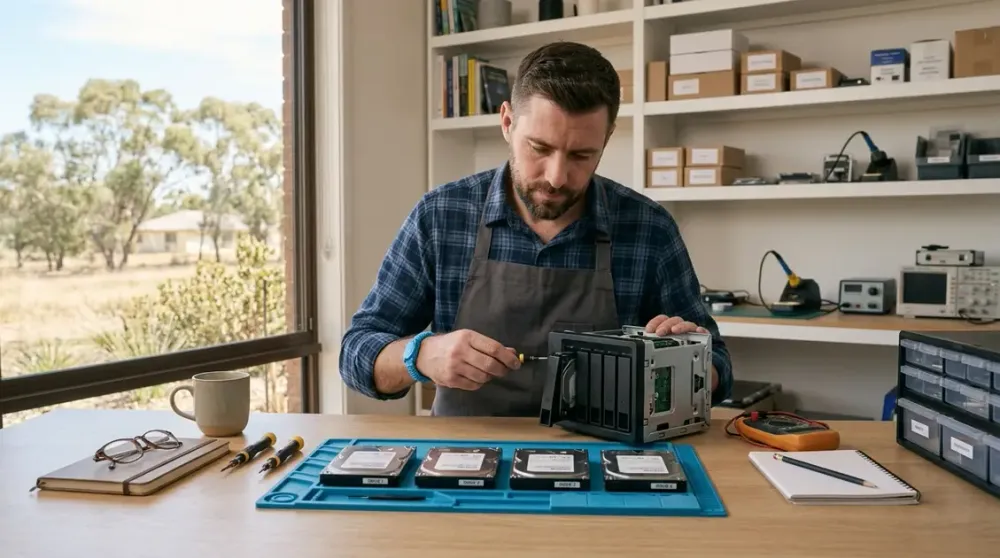
A RAID warning can look deceptively simple: one disk has failed, the array is degraded, or a NAS volume has suddenly disappeared. The next click matters. A correct repair may restore redundancy, while a premature rebuild, initialisation or disk swap can overwrite information needed to recover the files.
RAID data recovery is the careful process of retrieving data from a failed or inaccessible disk array. It may involve recovering individual drives, reconstructing how blocks were arranged, rebuilding the logical file system and copying verified files to separate storage. This guide explains how that process works, what the common RAID levels can tolerate, which first steps are safe, and when a Perth household or small business should stop and get specialist advice.
Key takeaways
- Stop writes to an uncertain or failed RAID array; do not initialise, format or blindly rebuild it.
- RAID can keep a system available after some disk failures, but RAID is not a backup.
- Recovery depends on the RAID level, drive order, stripe size, parity layout, controller or NAS metadata, and the condition of every member disk.
- A known single-disk failure in a healthy redundant array may be routine maintenance; multiple failures, physical symptoms or important unbacked-up data need a more cautious recovery path.
- Successful recovery ends with files copied to separate storage and checked, not merely with the old array appearing online again.
What RAID is and what it protects against
RAID stands for Redundant Array of Independent Disks. It combines physical hard drives or SSDs into a logical storage unit. Depending on the level, data may be striped across disks for performance, mirrored for redundancy, or protected with parity information that can reconstruct missing blocks. IBM's RAID documentation describes the different trade-offs in redundancy, capacity and performance.
The familiar levels behave differently:
- RAID 0 stripes data across at least two disks. It offers no redundancy. Losing any member breaks access to data spread across the set.
- RAID 1 stores mirrored copies. A conventional two-disk mirror can normally remain available after one disk fails, provided the other copy is healthy.
- RAID 5 stripes data with distributed parity and normally tolerates one failed member.
- RAID 6 uses two independent parity values and normally tolerates two failed members.
- RAID 10 stripes data across mirrored pairs. It can survive certain multiple-drive failures, but not the loss of every copy in the same mirror pair.
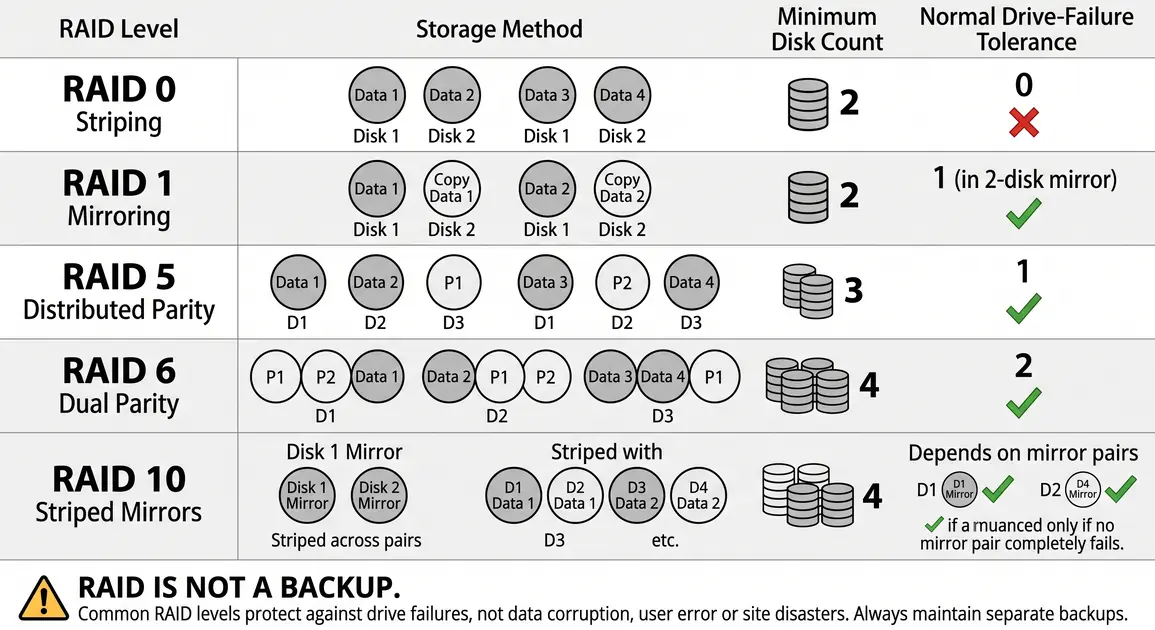
These are design tolerances, not recovery guarantees. A second disk may contain unreadable sectors, metadata may be corrupt, or a controller may have written inconsistent data before the fault was noticed. Rebuild activity also reads every required block and writes large amounts of data, which puts stress on the remaining drives.
RAID is therefore an availability tool, not an independent copy of your files. Mirroring instantly repeats deletion, corruption and ransomware encryption. All disks in a NAS can also be affected by theft, fire, liquid, power damage or a mistaken configuration change. A separate backup is what lets you restore data without depending on the array that failed.
What RAID data recovery means
RAID recovery has two layers that are often confused.
Array repair or rebuild restores redundancy after an expected failure. For example, a supported NAS may replace one confirmed failed disk in a degraded RAID 5 set and calculate its missing contents onto a new disk. That is normal maintenance only when the array's status, configuration, remaining disks and backup are trustworthy.
Data recovery aims to preserve and extract files when the array is inaccessible, its state is uncertain, too many members have failed, or the file system is damaged. Recovery may reconstruct the array virtually from images rather than writing changes to the original disks. The priority is the data, not returning the original hardware to service.
This distinction explains why “click rebuild” is not universal advice. Synology, for example, treats a readable crashed volume differently from an unreadable one: its current guidance says to copy readable data first, while an unreadable volume should be referred for data rescue rather than treated as a routine repair. See Synology's volume-crash guidance. Other NAS brands and controller versions use different status labels and procedures, so follow the documentation for the exact model only after the data risk is understood.
Why RAID arrays fail
A RAID failure is not always a dead disk. Common causes include:
- one or more HDDs or SSDs failing, developing unreadable sectors or dropping offline;
- a failed RAID controller, NAS chassis, backplane, cable or power supply;
- lost or damaged array metadata, an incorrect drive order, or the wrong stripe and parity parameters;
- file-system corruption after an unsafe shutdown, software fault or storage fault;
- accidental deletion, formatting, initialisation or reconfiguration;
- interrupted, incorrect or unsuccessful rebuilds;
- malware or ransomware changing data that RAID faithfully mirrors; and
- fire, liquid, impact, electrical damage or overheating.
Symptoms overlap. A controller fault can make several healthy disks appear absent. Conversely, replacing the controller with a merely similar model may import metadata differently or offer to initialise the disks. Labels, logs and the exact sequence of events are important evidence.
What to do first when a RAID fails
1. Decide whether the array is simply degraded or genuinely uncertain
If the system reports one failed disk but files remain accessible, avoid unnecessary writes and confirm the exact RAID level, failed bay and backup status. Do not assume the first disk marked “failed” is the only problem. If data is important and not backed up, copy the most important accessible files to separate storage before a rebuild, if the system can read them without repeated errors.
If the volume is missing, crashed, read-only, repeatedly disconnecting, or reporting more failed disks than the RAID level tolerates, treat it as a recovery incident. Stop experimentation.
2. Record the state before changing anything
Photograph or label each drive by bay order. Record the NAS or controller model, RAID level if known, capacity of each disk, error messages, indicator states, recent disk replacements, power events and every action already taken. Do not shuffle disks to “see what works”. Drive order and configuration metadata can be essential for reconstruction.
3. Prevent destructive writes
Do not initialise, format, create a new pool, force an array online, run file-system repair, update drive firmware or start a rebuild merely because the interface offers it. Do not install recovery software onto the affected array or save recovered files back to it. Each action can change metadata or overwrite recoverable blocks.
If a hard drive clicks, scrapes, repeatedly spins up and down, is not detected consistently, or has suffered impact, liquid or electrical damage, stop powering it. If there is smoke, a burning smell, sparks, a swollen battery, exposed mains electricity or liquid near powered equipment, disconnect power only if it is safe to do so and seek qualified help. Do not open a hard drive or power supply.
4. Check for a usable backup
A verified backup can turn a risky recovery into a straightforward replacement and restore. Confirm that the backup contains the needed folders and that recent files can actually be opened before erasing or recreating anything. The Australian Cyber Security Centre recommends regular backups, protection of backup accounts and at least one offline or otherwise isolated copy; its backup guidance also explains why ordinary cloud synchronisation may not protect against ransomware.
How professional RAID recovery works
The exact workflow varies, but a preservation-led recovery normally follows these stages.
- Triage and diagnosis. The technician documents the array, symptoms and incident history, then assesses each member disk and the enclosure or controller. The goal is to separate physical, electronic and logical faults before making changes.
- Stabilise failed media. Physically failing drives may need specialist hardware work before they can be read reliably. Clean controlled work is relevant when sealed hard-drive components must be opened; it is not automatically required for every controller fault, SSD problem or logical failure.
- Create sector-level images or clones. Recoverable member disks are copied to suitable destination media, with failing areas handled carefully. Work then proceeds from the images where possible, preserving the originals. This read-only principle is also used in formal disk acquisition: NIST guidance explains that write blockers can prevent changes to source media during imaging.
- Determine the array geometry. The recovery system identifies member order, offsets, stripe or chunk size, parity rotation, mirror relationships and any controller-specific metadata. Logs and configuration records can shorten this process, but parameters can sometimes be inferred from consistent data patterns.
- Reconstruct the array virtually. Software combines the images using the identified layout. For parity arrays, it calculates missing blocks where the surviving data permits. This is different from blindly rebuilding onto an original disk.
- Repair or interpret the logical layer. Once a coherent virtual volume exists, the file system, partitions, volumes, encryption and snapshots are examined. If metadata is damaged, files may need to be recovered from remaining structures or signatures.
- Extract and verify files. Recovered data is copied to separate clean storage. Folder structure, file counts, sample files and—where available—checksums or application-level validation are used to assess the result. The original array should not be reused until the recovered copy has been reviewed.
Encryption adds another dependency. BitLocker, encrypted NAS volumes and self-encrypting drives may require recovery keys, passphrases or controller information. Recovery cannot legitimately bypass sound encryption. If keys are uncertain, preserve the device state and locate them before resetting hardware or accounts.
Recovery differences by RAID level
RAID 0 recovery
Because RAID 0 has no redundant copy or parity, all member disks and the correct geometry are usually needed for complete reconstruction. A controller failure or damaged metadata may still be recoverable if every disk is readable. If one disk has physical unreadable areas, files whose blocks cross those areas may be incomplete even when other members are healthy. The source post's claim that RAID 0 can survive one failure was rejected: it cannot.
RAID 1 recovery
A simple mirror may allow files to be copied from the surviving member, but first confirm that it is the current, healthy copy. Accidental deletion, file-system corruption and ransomware normally affect both mirrors. If both disks are damaged or the array uses vendor-specific metadata or encryption, recovery is no longer just a matter of connecting either disk.
RAID 5 and RAID 6 recovery
Parity allows reconstruction only within the level's failure tolerance and only when the remaining blocks are readable and consistent. RAID 5 normally tolerates one unavailable member; RAID 6 normally tolerates two. Beyond that, recovery may depend on extracting additional sectors from nominally failed drives. Wrong member order, stale disks and parity inconsistency can cause a rebuild to produce corrupt data without making the mistake obvious.
RAID 10 recovery
RAID 10 recovery depends on which disks failed. The loss of one disk from different mirror pairs may leave a valid copy of every stripe, while losing both sides of one pair can break the array. Correctly identifying the mirror pairs and the freshest members matters.
DIY recovery or professional help?
The safest option depends less on the product name than on the value of the data and certainty of the failure.
A competent administrator may perform a vendor-documented disk replacement when all of these are true: the array is merely degraded, the RAID level still protects the data, the failed member is unambiguous, remaining disks are healthy, a separate verified backup exists, the replacement is compatible, and the exact procedure for that model is understood. Even then, copy important data first where practical and monitor the rebuild.
DIY recovery software is a different proposition. It may be reasonable for an experienced person working from complete read-only images of logically healthy disks, with known geometry and spare destination storage. It is not a safe learning exercise on the only copy of important family photos, client records or business files.
Choose specialist assessment when:
- two or more disks are missing or failed, or the failure exceeds the RAID level's tolerance;
- any disk clicks, scrapes, disappears intermittently or suffered physical damage;
- a rebuild failed, was interrupted, or used the wrong disk;
- the array was initialised, formatted or reconfigured;
- drive order, stripe size, parity layout or controller history is unknown;
- encryption or recovery keys are uncertain;
- the only copy of important data is on the array; or
- the cost of another failed attempt is greater than the cost of assessment.
Avoid providers who promise a guaranteed outcome before diagnosis. Ask how originals will be protected, whether work is performed from images, how physical media is handled, where recovered files will be stored, how confidentiality is managed, and what validation will be reported. Do not rely on an unsupported “higher success rate” percentage or a generic price range; complexity, media condition and required parts vary widely.
Preventing another RAID recovery incident
Once the data is safe, replace or rebuild the storage system rather than treating the recovered array as trusted production storage. Then reduce the chance and impact of another failure:
- Keep at least one separate backup that the RAID cannot overwrite. Use a mix of local and offsite or cloud copies appropriate to your data and internet connection.
- Keep an offline, immutable or versioned copy for protection against ransomware and accidental deletion.
- Test restores. A successful backup notification does not prove that the required folders, permissions and application data can be restored.
- Configure NAS or controller alerts and make sure they reach someone who will act. Review disk, pool, backup and capacity status regularly.
- Replace failed disks promptly using the vendor's compatibility guidance, but do not replace several members at once.
- Record the NAS/controller model, RAID level, disk bay order, encryption and recovery-key location, backup destination and restore procedure. Store a copy away from the NAS.
- Use safe shutdown support and suitable power protection where outages are a recurring risk. A UPS improves shutdown behaviour but does not replace backup.
For a Perth home office or small business, recovery planning should also account for the time needed to move a large dataset. Restoring terabytes from cloud storage can be limited by the internet connection, while an onsite backup can be faster but remains exposed to the same theft or building incident if it is the only copy. A practical plan uses more than one recovery path.
A careful next step
If your array has failed, preserve the current state and write down what happened before trying another repair. If the data is backed up and the fault is a documented single-disk failure, follow the exact vendor procedure. If the state is uncertain or the only copy is at risk, pause and arrange an assessment through Perth Computer Experts or an appropriate specialist data-recovery laboratory before a rebuild changes the evidence.