
Securing Your Backup Data Against Cyber Threats: A Perth Guide
Backups are meant to be your last line of defence — but only if they're encrypted, isolated and tested. Here's how to secure yours in Perth.
When ransomware hits a business, the file server usually isn't the only target. Attackers increasingly go after backup copies first — deleting or encrypting them before touching the live systems — because a business that can restore from backup has far less reason to pay a ransom. If your backups aren't separately protected, they can be wiped out in the very attack they're meant to protect you from.
Most small businesses put real effort into securing day-to-day systems: antivirus, firewalls, staff awareness. The backup often gets treated as a box that's ticked once it's running. That gap matters. A backup that any logged-in user — or any attacker who compromises that user's account — can read, modify or delete isn't really a safety net. It's just another copy sitting inside the same exposure.
This guide walks through the practical steps that keep backup data secure: encryption, access control, isolation and regular testing, along with the threats that specifically target backups and how to choose backup storage that suits a Perth home or small business setup.
Key takeaways
- Backups need their own security controls — encryption, MFA and access limits — separate from your everyday systems.
- Ransomware and other destructive attacks often target backup copies directly, so at least one copy should be offline, immutable or otherwise isolated from your main network.
- A backup you haven't test-restored isn't a verified backup — build restore testing into a regular schedule.
- Cloud, on-premise and hybrid backups each need to be secured differently; the right mix depends on your data, connection and recovery needs.
- A documented disaster recovery plan, with clear recovery time and recovery point targets, is what turns a backup into an actual recovery capability.
Why backup security matters as much as your live systems
Your backup is meant to be the fallback when something else goes wrong — a ransomware infection, a failed drive, a stolen laptop, or a mistake that deletes the wrong folder. For that fallback to work, it has to survive whatever caused the original problem.
Many Perth small businesses now run day-to-day work through Microsoft 365, Google Workspace or similar cloud platforms, with file sync tools like OneDrive or Google Drive keeping copies of documents up to date. Sync isn't the same thing as a backup: it's designed to mirror your current files, including deletions and, in some cases, files a ransomware attack has already encrypted. Whether that's a real gap for you depends on your provider's version history and retention settings — worth checking rather than assuming.
The Australian Cyber Security Centre notes that adversaries are aware of the importance of backups and will actively try to disable them before carrying out their main attack. That's the core reason backup security deserves the same attention as the systems it's meant to protect.
Best practices for securing your backup data
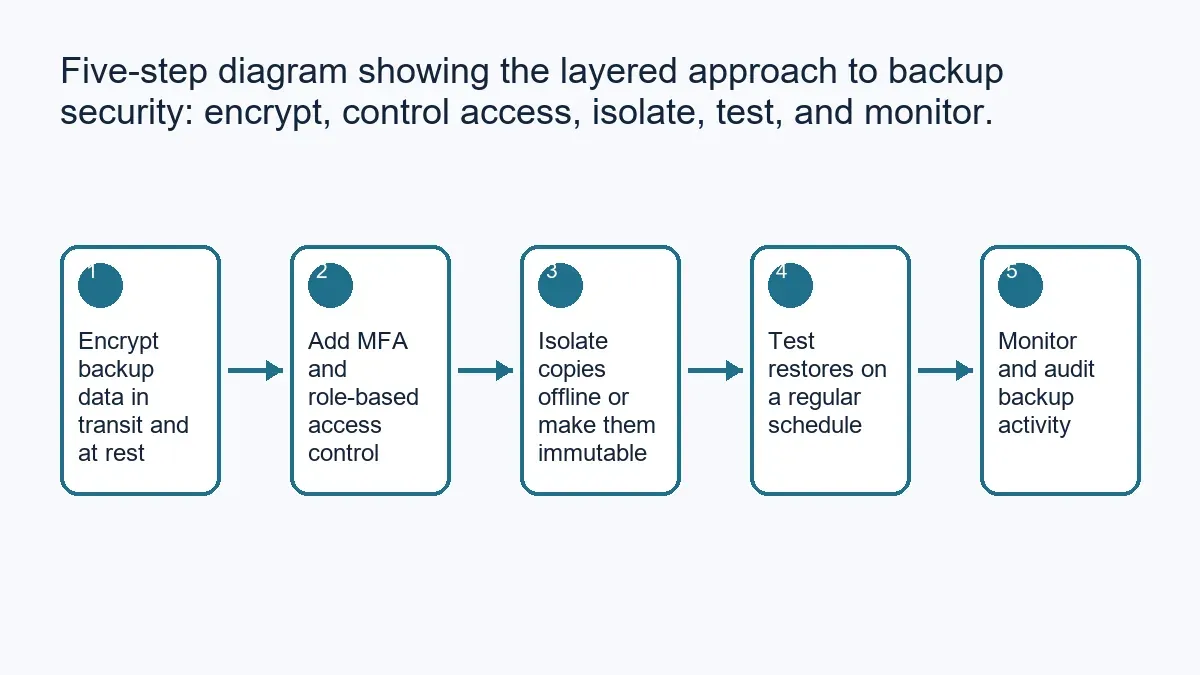
The practices below work best as layers rather than a single fix — each one closes a gap the others don't cover.
Encrypt your backup data
Encryption means that even if a backup file is intercepted, stolen, or accessed by someone who shouldn't have it, the contents stay unreadable without the decryption key.
Look for a backup solution that encrypts data both in transit (while it's being copied to storage) and at rest (once it's sitting in storage). Just as importantly, manage the decryption keys carefully — if everyone with backup access also holds the key, encryption isn't adding much protection. A data encryption and secure access review can confirm this is set up correctly across your backup and storage systems.
Use multi-factor authentication (MFA)
MFA requires a second form of verification — a code from an authenticator app, a prompt on your phone, or a security key — in addition to a password, before someone can access an account or system.
The Australian Cyber Security Centre recommends MFA wherever it's available, and backup systems are a good example of why: a stolen password alone shouldn't be enough to reach months of business data. Turn on MFA for your backup software's admin console, your cloud storage account, and any remote access to physical backup servers or NAS devices.
Apply access control and the principle of least privilege
Not everyone in the business needs access to backup files, and fewer people still need permission to delete or modify them. Role-based access control assigns permissions according to what someone's job actually requires, and the principle of least privilege keeps that access to the minimum necessary — rather than defaulting to broad admin rights because it's simpler to set up.
Isolate backup copies from your main network
If your backup lives on the same network, with the same credentials, as your production systems, an attacker who compromises one can often reach the other. A widely used approach — sometimes called the 3-2-1 rule, and extended by some practitioners to 3-2-1-1-0 for ransomware resilience — is to keep at least three copies of important data, on two different types of media, with at least one copy offsite and at least one copy offline or immutable (unable to be altered or deleted, even with valid credentials, for a set retention period).
Air-gapped backups (physically or logically disconnected from the network) are the strongest form of isolation for genuinely critical data, though not always practical for daily operations. Where a fully offline copy isn't realistic, an offsite cloud copy with immutability enabled is a reasonable middle ground.
If your business relies on an NBN connection to push large backups offsite, it's worth testing how long a full upload actually takes — some Perth premises have upload speeds that make same-day offsite backup of large datasets slower than the plan assumes, which matters when you're estimating recovery time.
Test your backups regularly
A backup is only useful if it can actually be restored, and restoration should be tested and measured rather than assumed. Perform test restores on a regular schedule — not just when something has already gone wrong — and check that the recovered data is complete and usable. Where possible, automate this testing so it happens consistently rather than depending on someone remembering to do it.
Cyber threats that specifically target backup data
Backup data faces some of the same threats as your live systems, plus a few that are specific to how backups are stored and accessed.
Ransomware
Ransomware attacks commonly aim to encrypt or delete both primary data and backup files, so there's no easy way to recover without paying. Offline, immutable and properly isolated backups (above) are the main defence, alongside network segmentation that limits how far an attacker can move if they get into one system. If ransomware has already reached your systems, our ransomware recovery service can help assess what's recoverable and what isn't.
Data breaches and unauthorised access
A data breach involving backup data happens when someone gains access they shouldn't have — often through a compromised account rather than a sophisticated technical exploit. Encryption, MFA and tight access control (all covered above) reduce this risk directly. It's also worth setting up alerts for unusual login attempts or access patterns on backup systems, so an intrusion is noticed quickly rather than sitting unnoticed for weeks.
Insider threats
Backup data can also be exposed by someone who already has legitimate access — a staff member or contractor who misuses their permissions, whether deliberately or by mistake. This doesn't need to be assumed as the most likely risk for every business, but it's a real one worth planning for: access logging, the least-privilege approach above, and basic staff awareness of why backup security matters all help limit the damage if it happens.
Choosing the right backup storage for your business
Where you store backups changes what you need to secure.
On-premise backup
Keeping backups on your own hardware gives you direct control, but that control comes with responsibility: physical security for the device, encryption, and genuine isolation from your production network rather than just a separate folder on the same server. When an old backup drive or NAS is retired, don't simply reformat it — arrange secure data deletion so the data on it can't be recovered by whoever ends up with the hardware next.
Cloud backup
Cloud backup is convenient and scales easily, but its security depends heavily on the provider you choose. Look for a provider that offers encryption in transit and at rest, clear access controls, MFA support, and transparency about where your data is physically stored. As noted above, it's also worth confirming realistic upload and restore times over your actual internet connection rather than assuming the marketed speed will match your experience.
Hybrid backup
A hybrid approach — combining on-premise and cloud backup — gives you redundancy: a fast local copy for everyday restores, and an offsite copy that survives a physical event like theft, fire or flood at your premises. Both halves need the same level of security attention; a hybrid setup is only as strong as its weaker copy.
Monitoring and auditing your backups
Backup monitoring tools track whether scheduled backups actually completed, and can alert you in real time if one fails or if something about the backup activity looks unusual — a sudden spike in deleted files, for example, can be an early sign of a ransomware attack in progress rather than something to investigate later.
Periodic audits are worth building into your routine too: checking encryption status, reviewing who has access and why, and confirming backup integrity. Many businesses find a quarterly or six-monthly review a practical rhythm, though the right frequency depends on how critical your data is and how often your systems change.
Backup data and your disaster recovery plan
A backup on its own isn't a disaster recovery plan — it's one component of one. A proper plan sets a Recovery Time Objective (RTO): how long the business can tolerate being without a system before it becomes a serious problem, and a Recovery Point Objective (RPO): how much data loss, measured in time, is acceptable if something goes wrong (an hour's worth of transactions, a day's worth of emails, and so on).
Those targets only mean something if they're tested. Simulating a disaster scenario — restoring a system from backup under realistic conditions — shows whether your actual recovery time matches what you've planned for, rather than what you hope is true. Automating parts of the recovery process can reduce downtime and human error during a genuine incident, though automation should be tested the same way as everything else before you rely on it.
Getting backup security right for your Perth business
Securing backup data takes the same layered approach as securing anything else worth protecting: encrypt it, control who can reach it, isolate at least one copy from your main network, and test that it actually works when you need it to.
If you'd like a second opinion on your current setup, Perth Computer Experts can review your backup and data protection arrangements and help put stronger safeguards in place where they're needed.