
Swollen Laptop Battery: Signs, Safety and Replacement
Learn how to recognise a swollen laptop battery, respond safely, choose a replacement path and arrange responsible disposal in Perth.
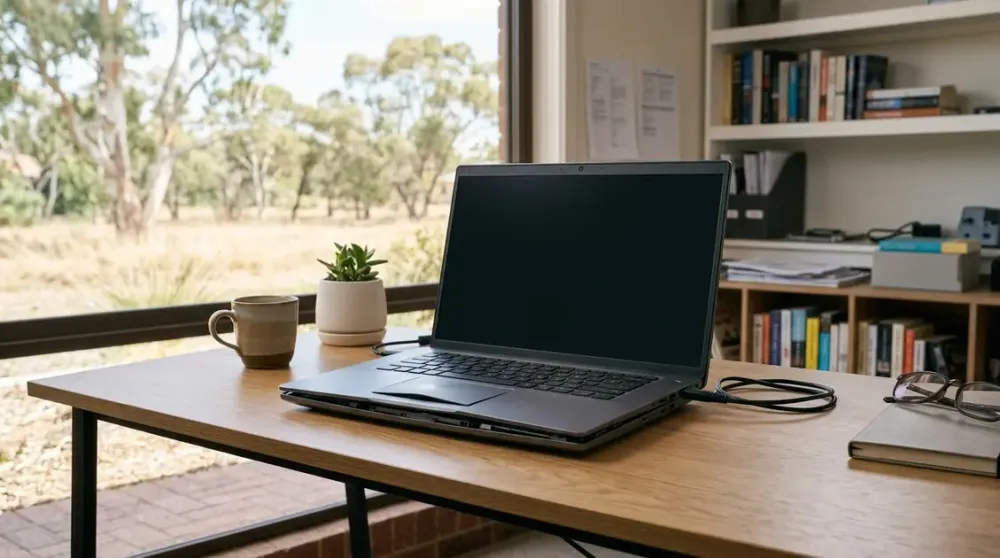
A laptop that rocks on a flat desk or has a trackpad that suddenly will not click may be showing an early warning, not ordinary wear. A battery can expand inside the case before the battery itself is visible, pushing against the keyboard, trackpad and base panel.
If you suspect a swollen laptop battery, treat it as a safety issue. Stop using and charging the device, avoid pressure on the casing, and do not open it simply to confirm your suspicion. This guide explains the signs, the safest immediate response, how battery checks fit in, when replacement is appropriate, and how to dispose of a damaged battery in Western Australia.
Key takeaways
- A rocking case, lifted trackpad, uneven keyboard or opening seam can indicate a swollen battery.
- Visible swelling is a stop condition: shut down, unplug and do not press, puncture or pry the battery.
- Battery-health software can show wear, but it cannot rule physical swelling in or out.
- A competent technician is the safer replacement choice once a built-in battery has swollen.
- Damaged batteries must not go in household bins or ordinary battery drop-off points.
What causes a laptop battery to swell?
Most modern laptops use rechargeable lithium-ion or lithium-polymer cells. As a cell ages or is damaged, unwanted chemical reactions can generate gas inside its sealed pouch. The pouch expands because that gas cannot escape safely. Microsoft describes this mechanism in its current Windows battery-care guidance, while Dell lists age, charge cycles and exposure to high heat among factors associated with swelling.
Several factors can contribute:
- Chemical ageing and charge cycles. Rechargeable batteries are consumable parts. Their useful capacity falls as their chemistry ages, even when the laptop is treated carefully.
- Heat. High operating or storage temperatures accelerate deterioration. A laptop left in a parked car during a Perth summer, used in direct sun, or run on bedding that blocks its vents can retain more heat than intended.
- Physical damage. A drop, crushing force, liquid exposure or previous repair damage can compromise a cell.
- A defective battery or charging system. Manufacturing faults and electrical problems are less common but possible. Check the maker's support site for recalls using the exact model and serial number.
- Long periods at a high state of charge. Keeping a lithium-ion battery at 100 per cent for extended periods can contribute to faster deterioration. That does not mean a modern laptop is continually being overcharged: charging controls normally manage the process, and some models offer smart charging.
Swelling is not an inevitable stage of normal wear. Many worn batteries simply deliver shorter run time. Once the case is expanding, however, the response should be based on physical safety rather than remaining capacity.
Signs of a swollen laptop battery
The clearest clues are changes to the shape or fit of the laptop:
- the laptop rocks or spins slightly on a hard, flat surface;
- the underside looks bowed or a base-panel seam has opened;
- the trackpad is raised, stiff or difficult to click;
- keys or part of the keyboard sit higher than before;
- the lid no longer closes evenly;
- screws appear tilted or a panel is forced away from the chassis; or
- an accessible battery pack looks puffy, distorted or cracked.
Dell's current guidance identifies bulging, case separation, a raised trackpad or keyboard, wobbling and lid misalignment as signs that a battery may be swollen. Expansion can place pressure on internal components as well as the enclosure.
Short run time, erratic charging, unexpected shutdowns or unusual heat can indicate a worn battery, charger, port or another hardware problem. They do not prove swelling alone. Conversely, a battery can be swollen even if software still reports acceptable capacity.
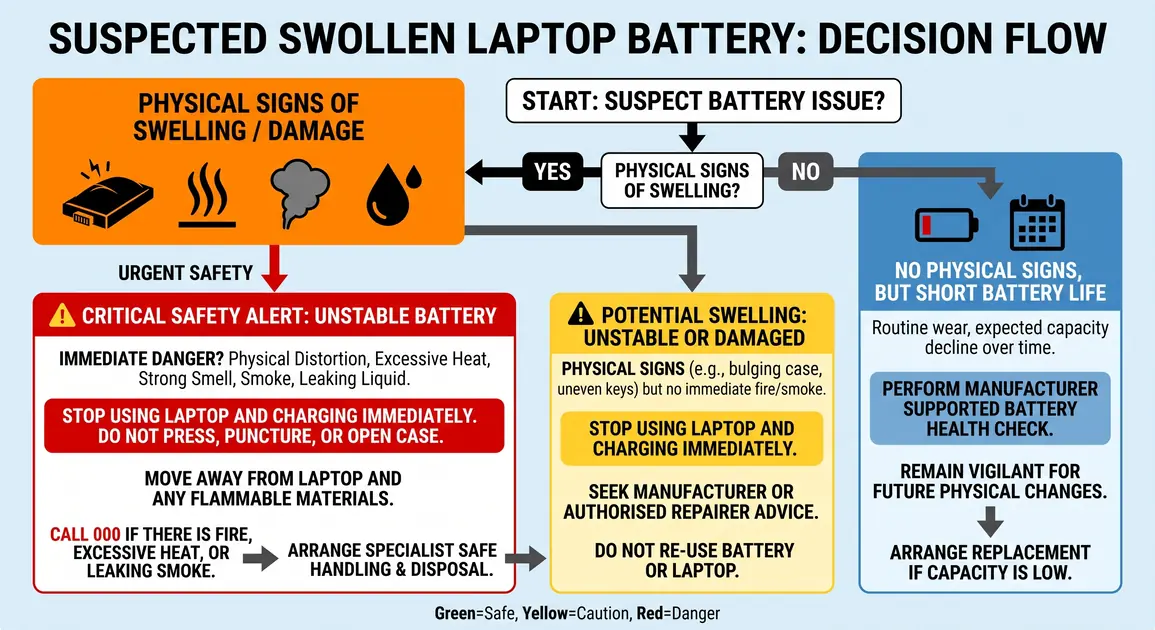
A chemical smell, hissing, popping, leaking, smoke, extreme heat or visible vapour indicates an urgent incident. Do not move or handle the device if doing so puts you at risk. Leave the area, keep others away and call Triple Zero (000) for an active fire or immediate danger.
How to check without making the problem worse
Start with a non-invasive inspection only.
- Disconnect the charger without pressing on a distorted part of the case.
- If the laptop is cool, stable and not smoking, leaking or making unusual sounds, shut it down normally.
- Place it on a hard, flat, non-flammable surface and look across the case from the side. Do not push down to see whether it flexes.
- Check for new gaps around the base, trackpad and keyboard, and see whether the lid lines up normally.
- Compare the shape with manufacturer documentation for that exact model.
Do not remove the base cover, squeeze the case closed, puncture the cell, bend it, or use a tool to pry against it. Dell specifically warns against applying pressure, bending or prying a swollen battery. If expansion has jammed the battery, stop rather than trying to free it.
Battery-health checks are useful, but separate
If there is no physical distortion and no overheating, smoke, leaking or damage, software can help assess ordinary wear.
On Windows 11, open Command Prompt as administrator, run powercfg /batteryreport, and open the HTML file saved at the path shown. Microsoft says the report provides installed-battery, recent-usage and estimated-capacity information. Compare design capacity with full-charge capacity over time; a reduction supports a diagnosis of wear but does not confirm swelling.
On a current Mac laptop, open Apple menu > System Settings > Battery and review Battery Health. Apple's “Service Recommended” status means capacity is reduced or the battery is not functioning normally. Apple says capacity-only issues can be safe to continue using. Physical swelling, heat or damage overrides that reassurance: stop using the Mac and arrange service.
If the casing is deformed, do not turn the laptop back on just to create a report or back up files. The safest time to maintain a backup is before hardware trouble develops. A repairer can discuss data access without unnecessarily energising a compromised battery.
What to do immediately when swelling is visible
Follow these steps only while they can be done without handling an unstable device:
- Stop using the laptop. Save work only if there is no heat, smell, noise, smoke or leaking and doing so takes no more than a normal shutdown.
- Disconnect external power. Do not reconnect the charger to test or deliberately drain the battery.
- Keep pressure off the case. Do not close a lid held open by distortion, pack the laptop tightly, or place anything on it.
- Keep it away from heat and combustible material. Use a clear area with a hard surface. Do not leave it in sun or a parked vehicle.
- Contact the manufacturer, an authorised provider or a competent repairer. Give the exact model and describe the physical symptoms before transport.
The WA Department of Fire and Emergency Services says never to use devices showing swelling, bulging, leaking, overheating or mechanical damage. Its lithium-ion battery guidance also distinguishes damaged batteries from ordinary used batteries and warns against regular waste or recycling bins.
Advice about moving or containing a damaged battery varies with its condition. A cool, intact but swollen laptop is different from one that is hot, venting, leaking or fire-affected. Do not improvise with water, sand, a sealed container or transport based on generic instructions. Ask the repairer, council, transfer station or emergency service what suits the actual condition.
Can you replace a swollen laptop battery yourself?
For most home users and small businesses, not safely once swelling is visible. A normal procedure can involve removing the base, disconnecting a cable and lifting a pack from screws or adhesive. Expansion can jam the pack and reduce clearance. A slip, twist or levering action may puncture or crush a pressurised cell.
The distinction between worn and swollen matters:
- Worn but not damaged: A technically competent owner may follow the manufacturer's exact service manual if the model is designed for user replacement, the correct new part is available, warranty implications are understood and data is backed up.
- Swollen, leaking, hot or physically damaged: Stop. Do not follow a generic removal tutorial. Arrange qualified service and tell the provider about swelling before bringing the laptop in.
Apple states that built-in Mac laptop batteries should be serviced by a trained technician or under its model-specific repair manual. Dell recommends authorised support for a swollen battery and says not to pry against it. These current positions are more relevant than an old universal tool list.
Replacement is more than fitting a part. The technician should confirm the exact battery, inspect the case and nearby components for pressure damage, assess the charger, install the replacement without trapping cables, and check charging and temperature behaviour. Remote advice may identify symptoms, but replacement requires hands-on service. Perth Computer Experts lists laptop support within its verified home computer repair service.
Choosing the right replacement battery
Use the laptop's full model or service identifier, not appearance alone. Related models can use batteries with different voltage, shape, connector position or firmware. Prefer a genuine manufacturer part or a reputable, explicitly compatible replacement from a trustworthy channel.
Before authorising a repair, ask:
- Is the battery identified for my exact model?
- Has swelling damaged the trackpad, case or other components?
- Will the removed battery enter an appropriate disposal path?
- What parts-and-labour warranty applies?
- Is the laptop otherwise worth repairing, considering age, condition and software support?
Do not buy a used battery removed from another laptop. It has an uncertain temperature, charging and damage history. For Mac repairs, Apple recommends new rather than used cells because removal itself can damage a used cell.
How to store and dispose of a swollen battery in Perth
A damaged laptop battery does not belong in household rubbish, kerbside recycling or an ordinary battery collection box. Batteries can be crushed or short-circuited during processing, creating fires in vehicles and waste facilities.
Australia's official battery stewardship scheme, B-cycle, says badly damaged, swollen or bulging batteries must not go to a normal B-cycle drop-off point. Its current damaged-battery advice is to use a fire-resistant, non-airtight container, then contact the local council or transfer station to ask whether it can accept the battery; if not, contact an accredited collector.
Do not seal a swollen battery airtight because pressure can build. Do not store it with metal objects or other batteries. Keep it cool, dry, away from children and combustible material while following provider instructions. If it remains built into the laptop, say so; loose-battery programs may not accept the device.
Never reuse, donate or dismantle a swollen cell for a hobby project. The goal is material recovery through an appropriate recycling pathway, not giving a damaged cell a second life. If a repairer removes it, confirm whether they will retain it for compliant disposal.
How to reduce battery wear after replacement
No routine can guarantee a battery will never fail, but these habits reduce avoidable stress:
- Use the laptop on a hard surface that leaves vents clear.
- Keep it out of direct sun and never leave it in a hot vehicle.
- Use the manufacturer's charger or a correctly specified, reputable replacement.
- Keep supported operating-system, firmware and power-management tools current.
- Use the manufacturer's smart-charging or charge-limit feature when the laptop spends long periods plugged in. Microsoft notes that implementation varies, so check your model rather than forcing a universal percentage.
- Check capacity occasionally, but also inspect the laptop's physical shape.
- Arrange assessment after a significant drop, liquid exposure, unexplained overheating or recall notice.
Avoid folklore such as always discharging to zero or maintaining one exact percentage range. Battery-management systems vary, and routine deep discharge is unnecessary. Follow current maker guidance and focus on controlling heat, suitable charging equipment and early response to damage.
When to arrange professional help
Arrange physical service promptly if the laptop rocks, a seam opens, the trackpad or keyboard lifts, or the battery is visibly distorted. Tell the provider it may be swollen so they can advise on transport and prepare an appropriate work area.
For heat, vapour, smoke, hissing, leaking or fire, do not treat it as a routine booking. Move away, keep others clear and call Triple Zero (000) for an immediate threat. Once safe, follow DFES and hazardous-waste advice.
A swollen laptop battery is not a fault to monitor while continuing normal use. Shut down safely if you can, keep the device uncharged and undisturbed, and arrange qualified assessment and disposal.