
Banking Malware Recovery: How to Regain Control of Your Account
Practical, ACSC-aligned steps to recover from banking malware, secure a compromised bank account, and reduce the risk of it happening again.

Phishing was the most reported scam type in Australia in 2025, with 65,361 reports to Scamwatch, and a good number of those messages exist purely to get banking malware onto someone's computer or phone. If you're reading this because you've spotted a transaction you don't recognise, a login alert from an unfamiliar device, or your bank has already frozen your account, you're not dealing with a hypothetical risk — you're dealing with a live one, and what you do in the next hour matters more than getting every step perfect.
Banking malware is designed to sit quietly in the background, record what you type or intercept what you send, and hand your login details, one-time codes or even control of your banking session to someone else. Because it works unseen, most people only discover it once money has already moved or their bank flags something unusual, which is exactly why the next steps can feel urgent and confusing at the same time.
This guide covers what to do in the first few minutes and hours after a suspected banking malware infection, how to work with your bank to limit the damage, how to get the malware off your device safely, and what to change afterwards so it's harder for it to happen again. If you're in Perth and want help confirming your device is actually clean before you trust it with banking again, there's a note on that at the end.
Key takeaways
- If you suspect banking malware, disconnect the device from the internet and contact your bank straight away — speed matters more than doing every step in a particular order.
- Change your banking, email and other important passwords from a different, known-clean device, not the one that may be infected.
- Multi-factor authentication (MFA) stops most attempts to reuse a stolen password, so turn it on for online banking and email if it isn't already.
- A factory reset can remove stubborn malware, but only after your files are backed up — treat it as a last resort, not a routine fix.
- If unauthorised activity continues after you've run security scans, get a professional to confirm the device is actually clean before relying on it for banking again.
What counts as banking malware?
Banking malware is malicious software written specifically to capture your online banking credentials, one-time passcodes, or control of your banking session. It usually arrives after you've opened an infected attachment, installed something from an untrustworthy source, or clicked through to a fake bank login page.
A few terms get used loosely, so it's worth separating them:
- Banking trojans disguise themselves as legitimate software and, once installed, monitor your banking activity or inject fake login screens over your real banking app or website.
- Keyloggers record everything you type, including passwords and one-time codes, and send it to whoever installed them.
- Phishing isn't malware itself — it's the delivery method. A fake email, SMS or website tricks you into installing malware or typing your credentials directly into a fraudulent page.
- Remote access scams are a related but different threat: a caller pretending to be from your bank, telco or a tech company talks you into installing legitimate screen-sharing software, then uses that access to get into your accounts directly, without needing separate malware at all.
Knowing which one you're dealing with matters less in the first hour than reacting quickly — but it does affect the technical clean-up later.
Signs your bank account or device may be compromised
Watch for:
- Transactions, transfers or new payees you don't recognise.
- Login alerts from a device, location or browser you don't recognise.
- Repeated failed login attempts, or being locked out of your own account.
- Unexpected changes to your recovery email, phone number or security questions.
- Your bank contacting you about suspicious activity you didn't authorise.
- A device that's suddenly slower, showing unfamiliar pop-ups, or has security software that's been disabled without your knowledge.
Any one of these is worth acting on. Several together mean you should treat the account and the device as compromised until proven otherwise.
Immediate steps to take right now
Work through these in roughly this order — the first two can happen at almost the same time if you're able to make a call while disconnecting the device.
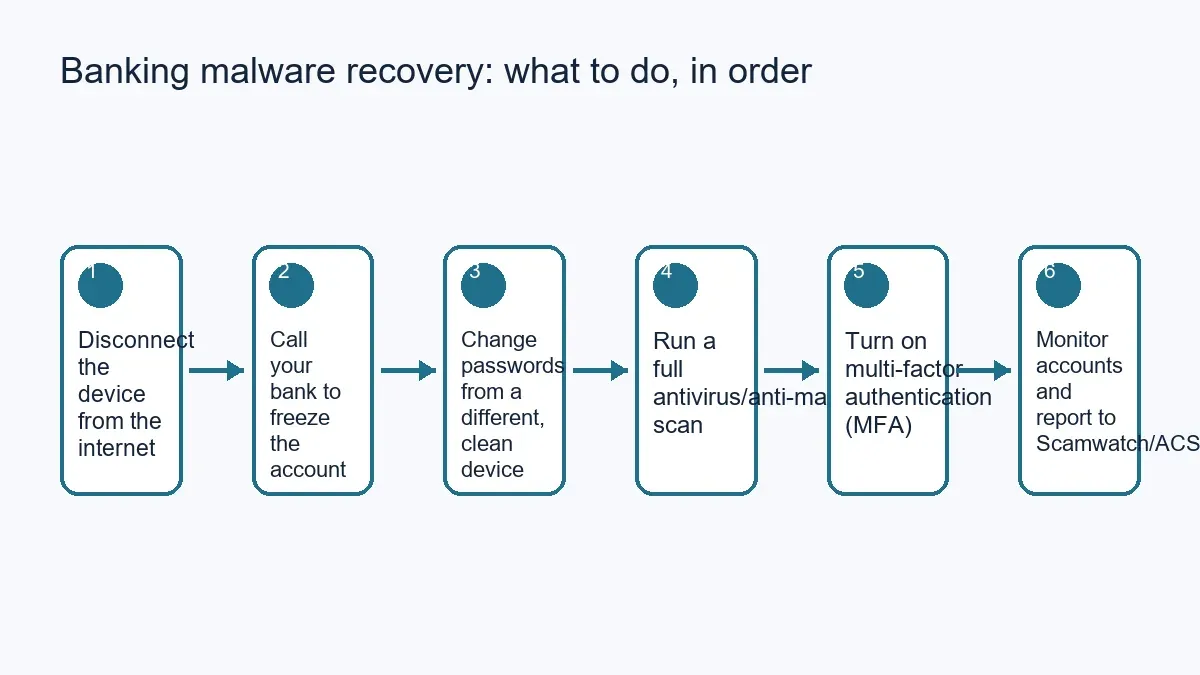
- Disconnect the device from the internet. Turn off Wi-Fi or unplug the network cable. This stops malware sending out any more of your data or receiving further instructions while you deal with the rest.
- Call your bank immediately, using the number on the back of your card or their official website — not a number from a text message or email you've just received. Tell them you suspect malware or unauthorised access, and ask them to freeze the account or card and review recent activity.
- Change your passwords from a different, known-clean device — a phone or another computer you're confident isn't infected. Start with online banking, then email, since email is often used to reset other accounts. Changing a password on the infected device itself can be pointless if a keylogger is still capturing what you type.
- Run a full scan with updated antivirus or anti-malware software on the affected device. A quick scan isn't enough here; use the full or deep scan option and let it finish.
- Turn on multi-factor authentication (MFA) on your banking and email accounts if it isn't already active. The Australian Cyber Security Centre notes that MFA defends against the majority of password-related attacks.
- Monitor your accounts closely for the following days and report the incident to Scamwatch and, if you'd like broader cyber security advice, the Australian Cyber Security Centre's hotline on 1300 292 371.
Getting the malware off your device safely
For many infections, a full scan from a reputable, updated antivirus or anti-malware tool will find and remove the threat. If your existing security software didn't catch it, running a second opinion scan from a different reputable vendor can help, since no single tool catches everything.
If the infection keeps returning, or you keep seeing unauthorised activity after cleaning the device, a full operating system reinstall or factory reset is sometimes the most reliable fix — but treat it as a last resort, not a first step.
Before you reset anything: back up your documents, photos and other personal files to a separate drive or cloud service, and where possible, have that backup checked for infection before you restore from it. A factory reset erases apps and settings along with any remaining malware, and it can't be undone once you've confirmed it. If you're not certain whether a reset is actually necessary, or whether your backup is clean, it's worth having a technician confirm this first rather than guessing.
Avoid quick fixes from a forum post that involve disabling your security software, making manual changes to system files, or running unfamiliar command-line tools — these can make an infected device harder to diagnose, not easier.
Working with your bank to recover funds
Reporting the incident to your bank as soon as you notice it gives you the best chance of having a payment stopped, reversed or investigated — the earlier you call, the more options they typically have. Ask specifically what their process is for unauthorised transactions, what evidence they need from you, and what happens next.
There's no guarantee of a refund in every case; it depends on your bank's policies, how quickly it was reported, and the specifics of what happened. Reporting the incident to Scamwatch (scamwatch.gov.au) as well as your bank helps authorities track the scam or malware method being used, even in cases where a specific refund isn't guaranteed.
Reducing the risk of it happening again
- Use unique passwords for banking, email and other important accounts, ideally generated and stored in a reputable password manager rather than reused across sites.
- Turn on MFA everywhere it's offered, especially for banking and email — it remains one of the most effective single steps you can take, according to the Australian Cyber Security Centre.
- Keep your operating system, browser, banking app and antivirus software up to date. Many infections rely on a known, unpatched flaw rather than anything exotic.
- Be cautious about banking on public Wi-Fi. The Australian Cyber Security Centre advises avoiding sensitive activity like online banking on public hotspots where possible, since data sent over them can potentially be intercepted; use your mobile data or a reputable VPN instead if you need to check your account while out.
- Treat unexpected calls or messages "from your bank" with suspicion, particularly if they ask you to install screen-sharing software or read out a one-time code. Legitimate banks won't ask for your full password or a one-time code over the phone.
- Set up transaction alerts and check statements regularly so unfamiliar activity is caught in days, not months.
When to get professional help in Perth
Running a scan and changing passwords resolves most infections, but sometimes it isn't enough — the malware keeps coming back, you're not confident the device is genuinely clean, or you'd rather have someone verify it properly before trusting it with banking again. That's a reasonable point to bring in a technician rather than repeating the same steps.
Perth Computer Experts' cybersecurity and scam protection service covers malware removal, antivirus setup and account security, including help getting multi-factor authentication properly configured across your accounts. If you're dealing with a suspected banking malware infection and want a second set of hands on the technical side, get in touch and we can talk through what you're seeing and the best next step.