
Bank Account Compromised by a Virus? Proven Recovery Steps
If malware has compromised your bank account, act fast. Follow these proven, Australia-focused recovery steps to secure your money and your accounts.

A message from your bank about a payment you didn't make is one of the most unsettling things you can find in your inbox. If a virus or other malware has been sitting on your computer, it can quietly capture your online banking login, card details or one-time codes and pass them straight to whoever is running it — often without a single obvious symptom beforehand.
Banking malware doesn't need much time to do damage. A keylogger can capture a password the moment you type it, and some trojans wait until you open internet banking before displaying a fake screen designed to capture extra security codes. The result can be unauthorised transfers, card-not-present purchases, or a run of suspicious login attempts, sometimes within minutes of the infection taking hold.
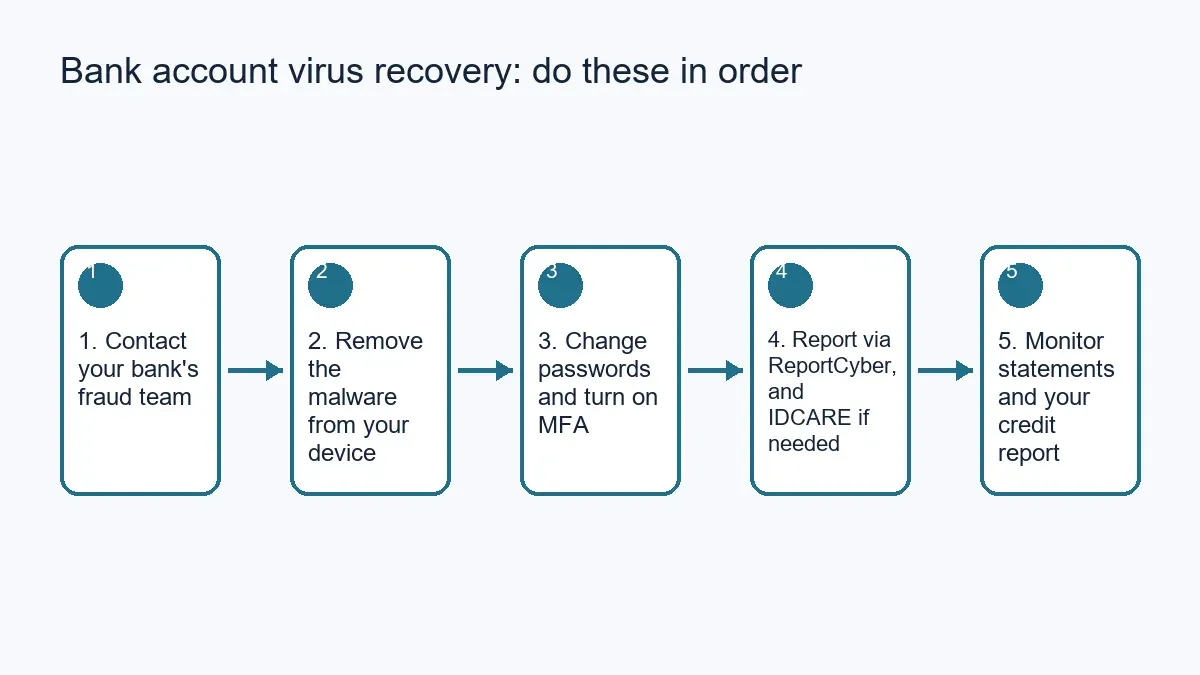
The order you respond in matters. Contacting your bank before you do anything else, then clearing the malware off your device and locking down your passwords, gives you the best chance of limiting the damage and stopping it from happening again. This guide walks through that process step by step, plus the follow-up checks that reduce the risk of a repeat.
Key takeaways
- Contact your bank's fraud team as soon as you suspect a breach. Banks that follow ASIC's ePayments Code are required to help with unauthorised transactions, and reporting quickly strengthens your position.
- Remove the malware from your device before you log back into internet banking, or the same details can be stolen again.
- Change your banking, email and other important passwords from a clean device, and turn on multi-factor authentication (MFA) wherever it's offered.
- Report the incident through ReportCyber at cyber.gov.au, which shares eligible reports with the police force covering your state, and contact IDCARE if your identity may be at risk too.
- Keep checking your bank and credit card statements for several weeks afterwards — not every fraudulent transaction shows up straight away.
Contact your bank immediately
Call your bank's fraud or card security line, or use the freeze/lock feature in its official app, as soon as you suspect a virus has touched your banking details. This is the single most time-sensitive step: it lets the bank block further transactions, put a hold on the affected account or card, and start investigating what's already gone through.
Ask for a reference number for your report. If your bank has signed up to ASIC's ePayments Code, as most retail banks have, it has obligations to help you with unauthorised transactions — but reporting promptly is what gives you the strongest position, so don't wait until you've cleaned up your computer first.
While you're on the phone, mention any other services linked to that account or card, such as PayPal, Buy Now Pay Later providers, or subscriptions, so your bank can flag related risks. If those services have their own logins, secure them separately once your device is clean.
Check your accounts for unauthorised transactions
Once the immediate risk is contained, log into your online banking from a device you're confident is now clean (see the next section) and go through recent transactions line by line. Look for transfers, purchases or new payees you don't recognise, including small "test" transactions, which scammers sometimes use to check a card is still active before a larger purchase.
Turn on real-time transaction alerts by SMS or email if you haven't already. They won't stop a fraudulent transaction, but they mean you'll know about the next one within minutes rather than at your next statement.
Report anything unfamiliar to your bank straight away and keep a note of the date, amount and your bank's reference number for each item — you'll want this record if you need to escalate a dispute later.
Remove the malware before you do anything else online
Don't do any further online banking, shopping or logins on the affected device until it's clean. Every extra session gives active malware another chance to capture something.
Start with a full scan using Microsoft Defender (Windows Security), which is built into Windows 10 and 11 and updates its threat definitions automatically, or the equivalent built-in protection on macOS. If you have a reputable third-party antivirus product installed and licensed, run a full scan with that as well — using more than one properly configured scanner isn't necessary day-to-day, but it's reasonable after a suspected breach. Quarantine or remove anything flagged, then reboot and run a second scan to confirm nothing was missed.
If the infection persists after scanning and removal — for example, if strange behaviour continues or the same alerts reappear — a clean reinstall of the operating system is sometimes the only reliable fix. Treat this as a last resort, not a routine step: back up your personal files first (documents and photos, not programs or files you can't verify are clean), understand that a reinstall removes your installed software and settings, and get help if you're not confident doing this yourself. If your device won't scan cleanly or you'd rather not attempt this alone, our virus and malware removal service can check and clear the device professionally.
Change your passwords and turn on multi-factor authentication
Once you're confident the device is clean, change your passwords — starting with online banking, then email (since email is often used to reset everything else), then any other account holding financial or personal information. Use a different, strong password for each one rather than reusing a password across sites.
Turn on multi-factor authentication (MFA) wherever your bank or account provider offers it. MFA means that even if a password is captured again in future, a second step — a code, app prompt or passkey — is needed before anyone can log in. Where a passkey option exists, it removes the password from that particular login altogether.
Change passwords for your other important accounts too, especially email, social media and shopping sites that hold saved card details.
Update your security software, browser and operating system
Outdated software is one of the ways malware gets a foothold in the first place, so once your device is clean, make sure it stays that way. Set Windows or macOS updates to install automatically rather than checking manually, and do the same for your web browser.
Check that your antivirus protection — whether that's Microsoft Defender or a licensed third-party product — is set to update its threat definitions automatically and that real-time protection is switched on, not just scheduled scans. Password and MFA account security support is also worth arranging if you want help getting MFA switched on consistently across your accounts rather than one at a time.
Consider a password manager
Reusing the same password, or a close variation of it, across multiple sites is one of the easiest ways for one breach to turn into several. A password manager, such as 1Password or the one built into your browser or phone, generates and stores a unique, strong password for every site, so you only need to remember one master password.
Turn on MFA for the password manager itself, since it's now protecting access to everything else. Once your account passwords are changed, store the new ones in the manager rather than writing them down or reusing an old pattern.
Keep monitoring your statements and credit report
Review your bank and credit card statements regularly for at least a few weeks after the breach, not just once. Some fraudulent activity — particularly identity-related fraud rather than direct account access — can take longer to appear than a simple unauthorised transfer.
You're entitled to request a free copy of your credit report every three months from Australia's credit reporting bodies. Checking it periodically can reveal accounts or credit applications you didn't make, which is often the first sign of broader identity theft rather than a one-off malware infection.
Report the breach through the right channels
Report the incident through ReportCyber at cyber.gov.au, the Australian Cyber Security Centre's (ACSC) online reporting tool. ReportCyber shares eligible reports with the police force covering your state or territory — WA Police for Perth and the rest of Western Australia — so you generally don't need to lodge a separate police report as well. If you need more general guidance, the Australian Cyber Security Hotline (1300 292 371) can also help.
If personal information beyond your banking details may have been exposed — for example, if the malware had access to saved documents, ID scans or other personal details — also contact IDCARE, Australia's national identity and cyber support service. It's free and can help you work out what else needs to be secured.
If your personal details may be at risk too
A device compromise isn't always limited to banking logins. If the malware had broader access to your computer, information such as your driver's licence, Medicare details or other identity documents stored on the device could also be at risk.
IDCARE can help you assess this and work out a response plan. It's also worth checking whether your details are showing up where they shouldn't with a dark web monitoring check, particularly if you're not sure exactly what the malware had access to.
Reduce the chance of it happening again
Most banking malware still arrives the same way it always has: a link or attachment in an unexpected email or message, a fake login page, or software downloaded from somewhere other than the official source. Being cautious about what you click, and downloading software only from official app stores or vendor websites, closes off the most common entry point.
Keep automatic updates switched on for your operating system, browser and antivirus software, and be careful about which Wi-Fi networks you use for online banking — a network you don't control and can't verify is not the place to log into your bank. Regular backups won't stop an infection, but they mean a serious one doesn't cost you your files as well as your peace of mind.
When it's time to get professional help in Perth
Most of the steps above can be done yourself with a bit of patience. But if the malware won't clear after scanning, you're not confident making changes to your operating system, or you'd simply rather have someone check the device properly before you trust it with online banking again, that's a reasonable point to bring in professional help.
Perth Computer Experts supports home users and small businesses across the Perth area with virus and malware removal and broader cybersecurity protection. If you'd like a hand securing your device and accounts after a breach, get in touch and we can talk through what's needed.