
Air vs Liquid Cooling for PC: Which Is Right for You?
Compare air coolers, AIO liquid cooling, case airflow, thermal paste, compatibility and safety to choose the right cooling for your PC.
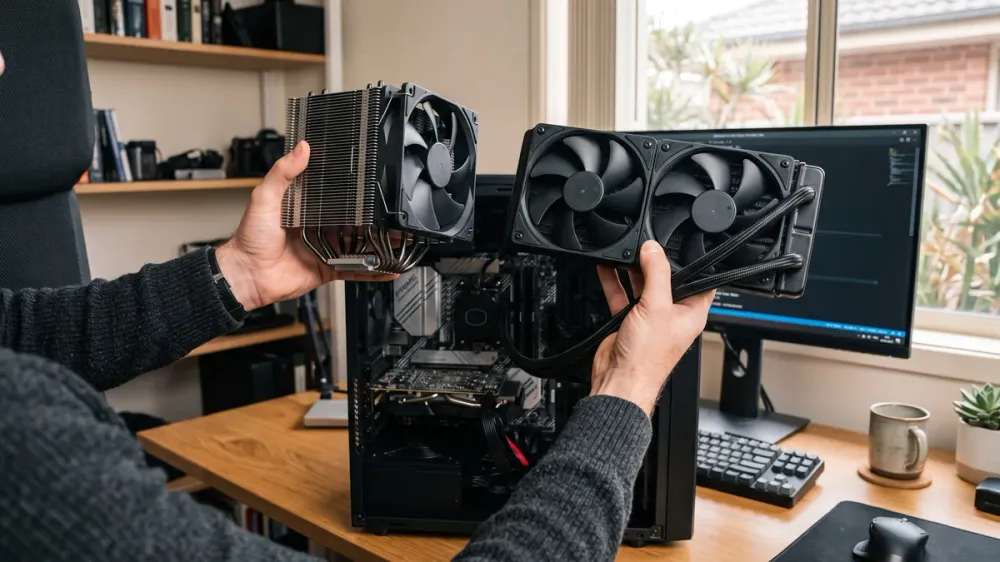
Choosing between air and liquid cooling is less about finding a universal winner and more about matching the cooler to the CPU, case and workload. A large air cooler can outperform a small liquid cooler, while a well-chosen all-in-one (AIO) liquid cooler can give a power-hungry processor more room to sustain performance.
The wrong choice is more likely to waste money, create extra noise or simply not fit than to transform an otherwise sensible PC. This guide compares air coolers, sealed AIOs and the specialist option of a custom loop, then explains case airflow, thermal paste, compatibility and testing so you can choose the right cooling system for your PC.
Key takeaways
- A quality air cooler is the best-value, lowest-complexity choice for many home, office and mainstream gaming PCs.
- A larger AIO is most useful when sustained CPU heat, case layout or appearance justifies its extra cost and pump-related failure point.
- CPU cooling cannot compensate for poor case airflow; plan filtered intake and a clear exhaust path around the whole system.
- Check the exact CPU socket, cooler rating, case clearance, RAM height and radiator support before buying.
- Custom water-cooling loops are enthusiast projects with more installation, leak-testing and maintenance risk than sealed AIOs.
Air cooling and liquid cooling explained
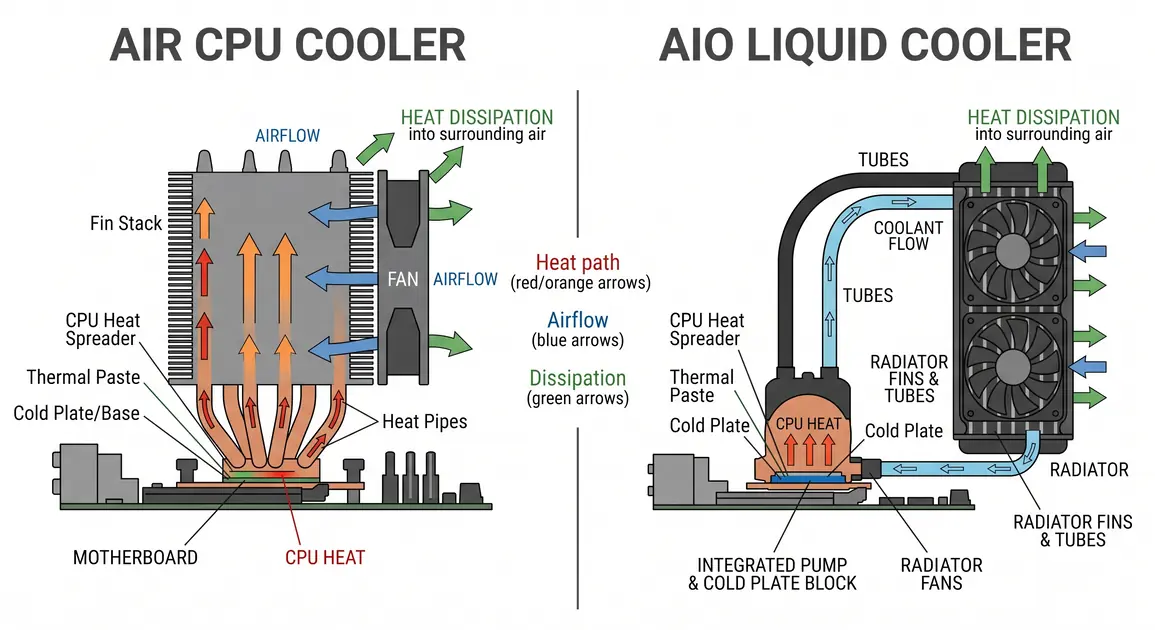
Both systems begin at the same place: the CPU transfers heat through its metal heat spreader and a thin layer of thermal interface material into a cooler. The difference is how that heat reaches the surrounding air.
An air cooler uses a metal base, heat pipes and a fin stack. One or more fans push case air through the fins, and the warmed air then needs to leave the case. Small stock coolers use the same principle, but a larger tower cooler has more surface area and can use larger, slower-spinning fans.
A sealed AIO liquid cooler places a cold plate and pump on the CPU. Coolant carries heat through tubes to a radiator, where fans transfer it to the air. "Liquid cooling" does not remove heat from the room or avoid fans; it moves the point where heat is released from the CPU socket to a radiator mounted elsewhere in the case.
A custom loop is different from an AIO. It is assembled from separate blocks, fittings, tubing, a pump, reservoir and radiator, and may cool the graphics card as well as the CPU. It offers more flexibility and visual customisation, but it is not a routine alternative for a first-time builder.
Air vs AIO: the differences that matter
Cooling performance
Cooler type alone does not determine temperature. CPU power, workload duration, fan and pump settings, case ventilation and room temperature all matter. AMD specifically notes that cooling effectiveness depends on ambient air temperature and the configuration of the system, components and cooling solution. Intel likewise advises checking the thermal specification for the exact processor rather than applying one generic temperature limit (AMD cooling guidance; Intel processor temperature guidance).
For web browsing, office applications and many games, a capable tower air cooler can handle the CPU without becoming intrusive. A larger AIO becomes more compelling when the processor draws substantial power for long periods, such as extended rendering, compiling or other all-core work. Its radiator can provide more heat-dissipation area and thermal capacity, but radiator size and product quality matter; a small AIO should not be assumed to beat a large air tower.
The practical goal is not the lowest possible idle reading. It is stable operation under the workloads you actually run, without sustained thermal throttling or excessive noise. Intel explains that processors use thermal controls to reduce power and frequency near their model-specific junction limit, so a temperature reading is most useful when interpreted alongside clock speed, power and workload (Intel).
Noise
Air coolers have fan noise. AIOs have radiator-fan noise plus a pump, which may add a hum or whine. Either design can be quiet when it has enough cooling area and a sensible control curve; either can be loud when undersized or configured to chase unnecessarily low temperatures.
Larger fans can often move the required air at a lower speed. AIO radiators also give builders more fan area, but the pump generally runs continuously. Compare measured reviews of the exact products at normalised noise levels where possible, rather than relying on "liquid is quieter" or "air is silent" as rules.
Reliability and maintenance
An air cooler is mechanically simple. Dust needs to be removed from its fins and fan, and a worn fan can usually be replaced without replacing the heat sink.
A sealed AIO also needs its radiator and fans cleaned. It adds a pump and liquid-filled loop, so there are more potential failure points. AIOs are factory sealed and are not normally opened or topped up by the owner; their warranty and expected service life vary by model. If pump speed falls, temperatures rise suddenly or you hear new grinding or gurgling after the system has settled, shut down and investigate rather than repeatedly running heavy loads.
Leaks are uncommon in reputable sealed products, but they are not impossible. If you see moisture, switch the PC off, disconnect mains power once it is safe to do so, and do not restart it. A burning smell, smoke, sparks or repeated thermal shutdowns are also stop conditions for professional inspection.
Cost and long-term value
Air cooling normally delivers the strongest value for a mainstream CPU because the design is simpler and can remain useful across several builds if compatible mounting kits remain available. An AIO costs more for the pump, tubing, radiator and additional fans. That premium can be worthwhile for sustained high-power workloads, difficult socket clearance or a particular case layout, but it does not guarantee better gaming performance.
Compare the complete installed cost, including any extra case fans or mounting hardware. Also consider what happens after a failure: an air-cooler fan is often replaceable, while a failed AIO pump typically means replacing the unit.
Space, appearance and access
Large air towers need sufficient height below the side panel and may overhang tall memory modules or make the top PCIe area harder to reach. Their weight also needs a correctly installed backplate and mounting system.
An AIO leaves more open space around the socket, but the radiator and fans need a compatible top or front mount. A case described as supporting a 360 mm radiator may still have conflicts with tall RAM, motherboard heat sinks, a long graphics card or front storage cages. Tube reach and bend radius also matter. Check the case manual and cooler dimensions together, not as separate purchases.
Case airflow matters whichever cooler you choose
A CPU cooler only transfers heat into the case air or radiator. The case must then bring in cooler air and expel warmed air from the CPU, graphics card, voltage regulators and storage.
A reliable starting layout is filtered intake at the front or bottom and exhaust at the rear or top. The arrows moulded into a fan frame usually show blade rotation and airflow direction. Do not depend on "hot air rises" alone: forced airflow from the fans is the dominant effect inside a compact case.
Static-pressure-oriented fans are useful where air must pass through a dense radiator, heat sink or filter. Airflow-oriented fans suit less restricted case openings. The labels are not absolute categories, so compare the manufacturer's pressure, airflow and noise specifications for the actual fan.
Slightly more filtered intake than exhaust can reduce unfiltered air being drawn through gaps, provided the case has sensible exhaust paths. Counting fans is not enough because different sizes, speeds and restrictions move different amounts of air. Aim for a clear path, clean filters and suitable fan curves rather than a perfect numerical "pressure balance".
Connect each fan to a suitable motherboard header or powered controller and stay within the header's current limit stated in the motherboard manual. Do not assume several fans are safe on one splitter. Secure cables away from blades; tidy routing helps serviceability and prevents obstruction, though a few well-placed cables rarely determine temperature by themselves.
In Perth, a hot room reduces the temperature difference available to every air or liquid cooler. A PC in an unventilated study or garage during summer may therefore run hotter than the same build in a conditioned room. Better room ventilation and keeping the case away from enclosed cabinetry can help before buying a larger cooler.
Thermal paste: important, but not a reason to choose liquid
Thermal paste fills microscopic surface gaps between the CPU heat spreader and cooler base, reducing resistance at that interface. AMD describes thermal interface material as a way to minimise contact resistance and improve heat transfer into the cooling solution (AMD TIM guidance). Both air coolers and AIOs need it, and many new coolers arrive with paste pre-applied.
There is no universal "pea-sized" instruction for every processor shape and paste. Follow the cooler or paste manufacturer's current diagram for your socket; Noctua, for example, publishes different guidance for supported AMD and Intel platforms, including AM5 and LGA1851 (Noctua application manual). Avoid electrically conductive liquid-metal compounds unless you understand their material compatibility and short-circuit risk.
If you remove a cooler, clean and replace the old compound before refitting it. Power down, unplug the PC and allow it to cool first. Twist a stuck heat sink gently as directed by the manufacturer rather than pulling forcefully, which can damage a socket or lift some CPUs from it. Use the cleaner and lint-free material recommended by the compound maker, let surfaces dry, then tighten the cooler gradually in the specified cross-pattern. Never compensate for a mounting problem by overtightening.
Thermal paste does not need replacement on an arbitrary calendar schedule if temperatures remain normal. Reapply it after removing the cooler, or when troubleshooting a verified contact problem after simpler checks such as dust, fan operation and fan curves. Do not run extreme stress tests merely to "cure" paste; a representative workload is safer and more useful.
Compatibility checks before buying
Use this checklist for either cooling type:
- Identify the exact CPU and socket. Do not rely only on a broad label such as "Intel Core" or "Ryzen". Confirm that the cooler includes the right bracket and hardware revision.
- Match cooling capacity to the processor and settings. Read the CPU maker's guidance and the cooler maker's compatibility list. Motherboard boost settings can increase sustained heat beyond a simple advertised power figure.
- Check physical dimensions. For air, compare cooler height, width and RAM clearance. For an AIO, check radiator length, thickness with fans, mounting position and tube reach.
- Plan airflow around the GPU. The graphics card has its own cooler but shares the case air. A front-mounted radiator may warm intake air; a top exhaust radiator may receive warmer case air. Either can work if the whole layout is tested.
- Check headers and controls. Confirm appropriate CPU-fan, pump and case-fan headers, plus any controller requirements. The motherboard manual is authoritative.
- Check the warranty and local support path. Read the exact cooler's warranty terms, including how consequential damage is handled; do not assume all liquid-cooler warranties are equivalent.
Socket names alone do not prove mounting compatibility. Hole spacing may be shared across generations while pressure requirements, backplates or included standoffs differ. Use the cooler manufacturer's live compatibility list for the exact model and motherboard.
Which cooling setup suits your PC?
Home and office desktops
A stock cooler supplied for the exact CPU, or a modest aftermarket air cooler, is usually the sensible starting point. Prioritise low noise, easy cleaning and a case with unobstructed intake. An AIO adds little value unless space around the socket creates a specific problem.
Mainstream gaming PCs
Gaming load is shared between the CPU and GPU, so case airflow is as important as the CPU cooler. A good tower cooler is often excellent value. A 240 mm or larger AIO can suit a build where radiator placement, socket access or appearance is important, but choose from model-specific performance and noise data.
High-power workstations and heavily tuned CPUs
Long rendering, encoding or compilation workloads can expose cooling limits that short tests and many games do not. A large dual-tower air cooler or a high-quality 280 mm or 360 mm AIO may be appropriate, subject to the processor maker's guidance and case support. Test the actual workload before changing firmware power limits or overclocking; those advanced settings can increase heat, instability and component stress.
Compact builds
Small-form-factor cooling is a constraint-solving exercise. A low-profile air cooler may be the only option in one case, while another case is designed around a specific radiator. Follow the case maker's recommended CPU-cooler height, radiator layout and graphics-card clearances. More cooling hardware can make airflow worse if it crowds the available path.
Custom water-cooling loops
A custom loop makes sense mainly for experienced enthusiasts who want to cool several high-heat components, design around unusual hardware or pursue a particular aesthetic. It requires compatible blocks and fittings, careful material selection, a drain plan, leak testing without energising vulnerable components, ongoing inspection and coolant maintenance.
That installation is beyond a safe general buying guide. A mistake can damage expensive hardware, and maintenance intervals depend on the components and coolant manufacturer rather than a universal six- or twelve-month rule. If you are not already comfortable planning and pressure-testing a loop, choose a sealed AIO or engage an experienced builder.
Install and test safely
Before opening the case, shut Windows down, switch the power supply off, unplug the mains lead and press the case power button briefly to discharge residual low-voltage power. Work on a stable, non-carpeted surface and follow the case, motherboard and cooler manuals. Never open a power supply or work on exposed mains components.
After installation, visually confirm that no cable touches a fan, all cooler fasteners are evenly seated, the CPU fan and any pump are connected to the specified headers, and protective film has been removed from the cooler base. For an AIO, follow its mounting-orientation instructions; poor placement can allow air to collect where it causes noise or impairs pump operation.
On first start, enter the motherboard's monitoring screen or use reputable monitoring software in the operating system. Confirm fan and pump readings, then observe temperature at idle and during a normal game or application. Compare against the exact processor specification and look for sustained throttling, clock reduction, abnormal noise or shutdowns rather than chasing one universal number.
Increase load gradually. If temperature rises immediately towards the processor limit, a fan or pump reports zero unexpectedly, or the system shuts down, stop the test and power off. Recheck mounting, power connections and paste application. Repeated thermal shutdowns, liquid, smoke, sparks or a burning smell require immediate stop and qualified help.
Make the choice based on the whole build
Choose a quality air cooler when you want strong value, simple maintenance and enough clearance. Choose an AIO when sustained heat, radiator-friendly case design or socket access genuinely benefits from it. Reserve a custom loop for an enthusiast project where you accept the extra planning, testing and maintenance.
Whichever option you prefer, verify it against the exact CPU, motherboard, memory and case before ordering. If you want help selecting, fitting or testing cooling as part of a Perth build or upgrade, Perth Computer Experts' custom PC builds and hardware upgrades service is the relevant next step.